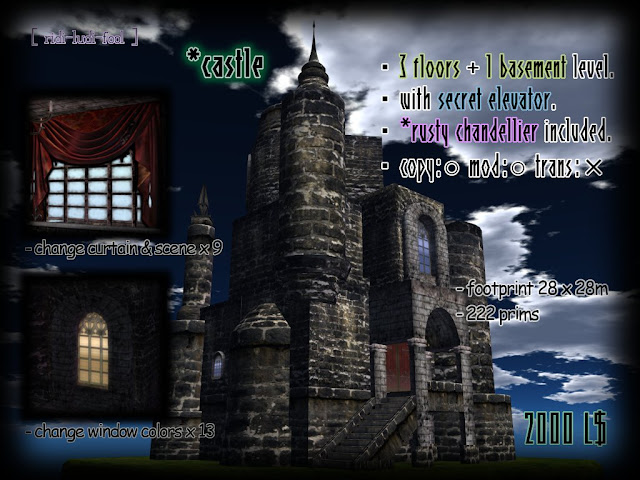
Do you like the building of such an atmosphere?


I am making the building.
It is not so exaggerated as a castle.
It is not so everyday as a house.
It is not a workplace as a sky-box.
It is not so religious as a church, either.
Such a thing.


I inform you that it became impossible to use the translation function of *ultra basic HUD.


・Related article *ultra basic HUD (Function explanation:1)
・Related article *ultra basic HUD (Function explanation:2)
・Related article *ultra basic HUD (Function explanation:3)


Because the system which HUD used for translation switched it to paid service from December 1, 2011, this problem happened.

When it translates regardless of language now, it returns "nu."

Because translation function of HUD was not usable, all of you using this become inconvenient, and I regret it very much.

There are no other problems.
You can use functions other than a translator as before.


A new branch shop was opened.


Please drop in when you can spare a moment.


[ ridi-ludi- fool ] NO.12
http://maps.secondlife.com/secondlife/Kourinbou/171/53/22
I am very grateful to all of you who bought our products and all of you reading this blog.


Access change script for * window door】

In *castle, there is the door to the terrace.
Although anyone can open and close the the door, we prepared this time 
the script which enables change of access to the door.

You only replace an old script with this new script,
and become able to choose the person who can access the door 
among "Owner only, Group member only, Anyone".

Please refer to the following reports about how to replace scripts.

※large window  gif anim. (crick to zoom)


about *castle http://ridi-ludi-fool.blogspot.com/2010/10/castle.html


The important news is delivered from [ ridi-ludi- fool ] group.
Please join us if interested.
http://world.secondlife.com/group/a528c4a9-31d8-c080-2d89-4c23494e821a

The script is in [ ridi-ludi- fool ] MAIN shop.
Please buy it with 0L$.


< How to replace script for *window door

1)Please be sure to shut a door and to begin work.

2)Edit *window door, and check "Edit linked" and choose the left side.
Delete an old script "New Script" in contents. Drag and drop a new script "*window door L" from your inventory to contents.


3)Check "Edit linked" and choose the right side.
Delete an old script "New Script" in contents.
Drag and drop a new script "*window door R" from your inventory to contents.


4)Dialog is displayed by your press and hold, and choose a button.
"Owner" --- Only an owner can open / close a door.
"Group" --- Only members of the group set at the door can open / close a door.
(A setup of a group is mentioned later)
"Anyone" --- Anyone can open / close a door.
"-exit -" --- Dialog is closed.


5)The door is opened and closed by a touch.


6)The present access permit describes at [description] of a general tab.
About a setup of the group permitted by "Group" ---
- The member of a group described in the [group] of a door is permitted access.
- How to change the group set as the door,
1)Push a button beside [group] and call a group list.
2)Choose the group which wants to admit access from a list, and push the OK button.
Cautions!!
When you rent land, objects may be returned if the group is changed.
Please confirm the agreement of land before change.
I am very grateful to all of you who bought our products and all of you reading this blog.


【Access change script for *castle window】

In *castle, there is a large window with nine sorts of window treatment.
Although anyone can change it,  we prepared this time the script which enables change of access to the window.

You only replace an old script with this new script,
and become able to choose the person who can access the window
among "Owner only, Group member only, Anyone".

Please refer to the following reports about how to replace scripts.

※*large window  gif anim. (crick to zoom)
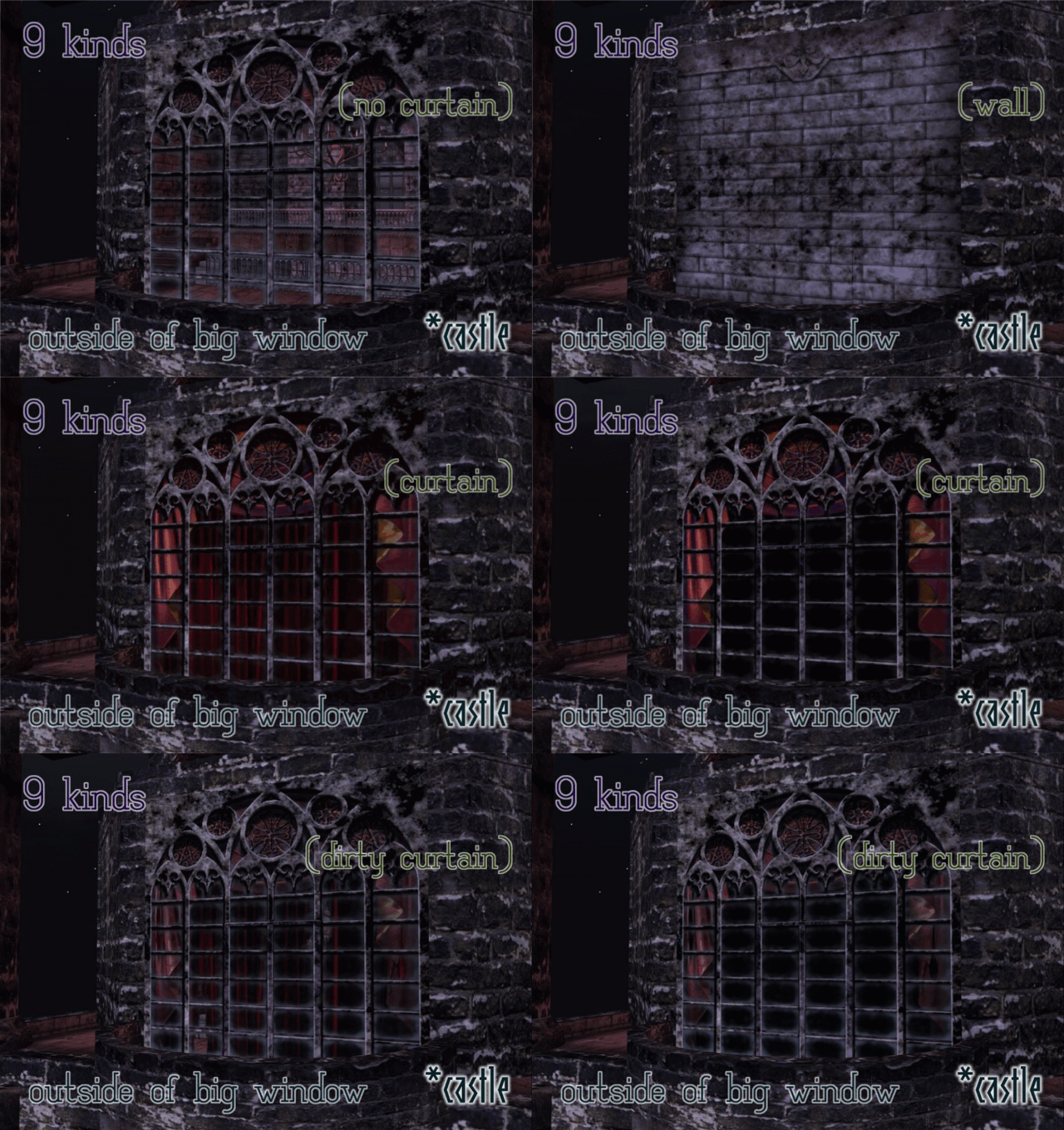


about *castle http://ridi-ludi-fool2.blogspot.com/2010/10/castle.html


The important news is delivered from [ ridi-ludi- fool ] group.
Please join us if interested.
http://world.secondlife.com/group/a528c4a9-31d8-c080-2d89-4c23494e821a

The script is in [ ridi-ludi- fool ] MAIN shop.
Please buy it with 0L$.


< How to replace script for *castle window

1)Which pattern of window treatment does not influence work.


2)Edit *castle window and drag and drop script "*castle window" from your inventory to contents.


3)Dialog for access change is displayed by your press and hold, and choose a button.
"Owner" --- Only an owner can change the window treatment.
"Group" --- Only members of the group set at the door can change the window treatment.
(A setup of a group is mentioned later)
"Anyone" --- Anyone can change the window treatment.
"-exit -" --- Dialog is closed.


4)Dialog for changing the window treatment is displayed by a touch.

A button is chosen and the window treatment is changed.


5)The present access permit describes at [description] of a general tab.
About a setup of the group permitted by "Group" ---
- The member of a group described in the [group] of a door is permitted access.
- How to change the group set as the door,
1)Push a button beside [group] and call a group list.
2)Choose the group which wants to admit access from a list, and push the OK button.
Cautions!!
When you rent land, objects may be returned if the group is changed.
Please confirm the agreement of land before change.
I am very grateful to all of you who bought our products and all of you reading this blog.


Access change script for *castle door

Although anyone can open and close the entrance door of *castle, we prepared this time the script which enables change of access to the door.

You only replace an old script with this new script,
and become able to choose the person who can access the door 
among "Owner only, Group member only, Anyone".

Please refer to the following reports about how to replace scripts.


about *castle http://ridi-ludi-fool.blogspot.com/2010/10/castle.html


The important news is delivered from [ ridi-ludi- fool ] group.
Please join us if interested.
http://world.secondlife.com/group/a528c4a9-31d8-c080-2d89-4c23494e821a

The script is in [ ridi-ludi- fool ] MAIN shop.
Please buy it with 0L$.


< How to replace script for *castle door

1)Please be sure to shut a door and to begin work.
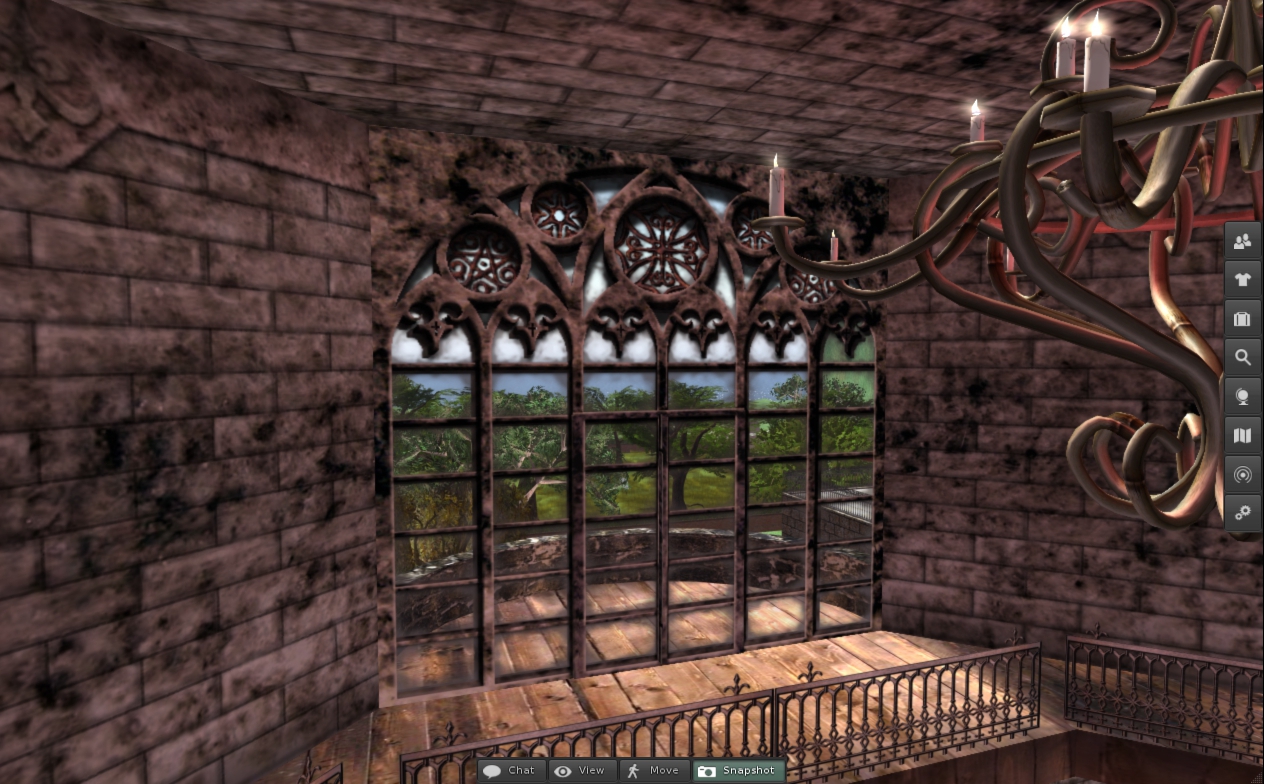
2)Edit *castle door, and check "Edit linked" and choose the left side.
Delete an old script "New Script" in contents. Drag and drop a new script "*castle door L" from your inventory to contents.
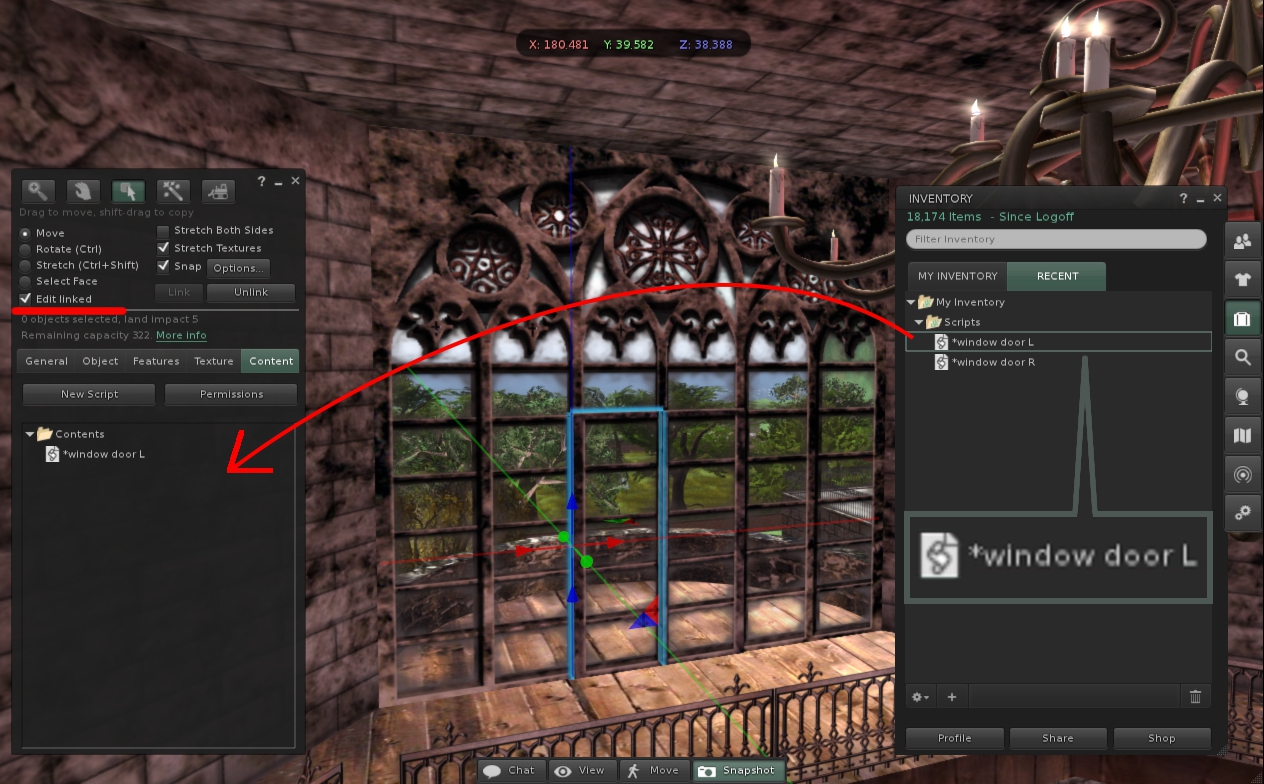

3)Check "Edit linked" and choose the right side.
Delete an old script "New Script" in contents.
Drag and drop a new script "*castle door R" from your inventory to contents.
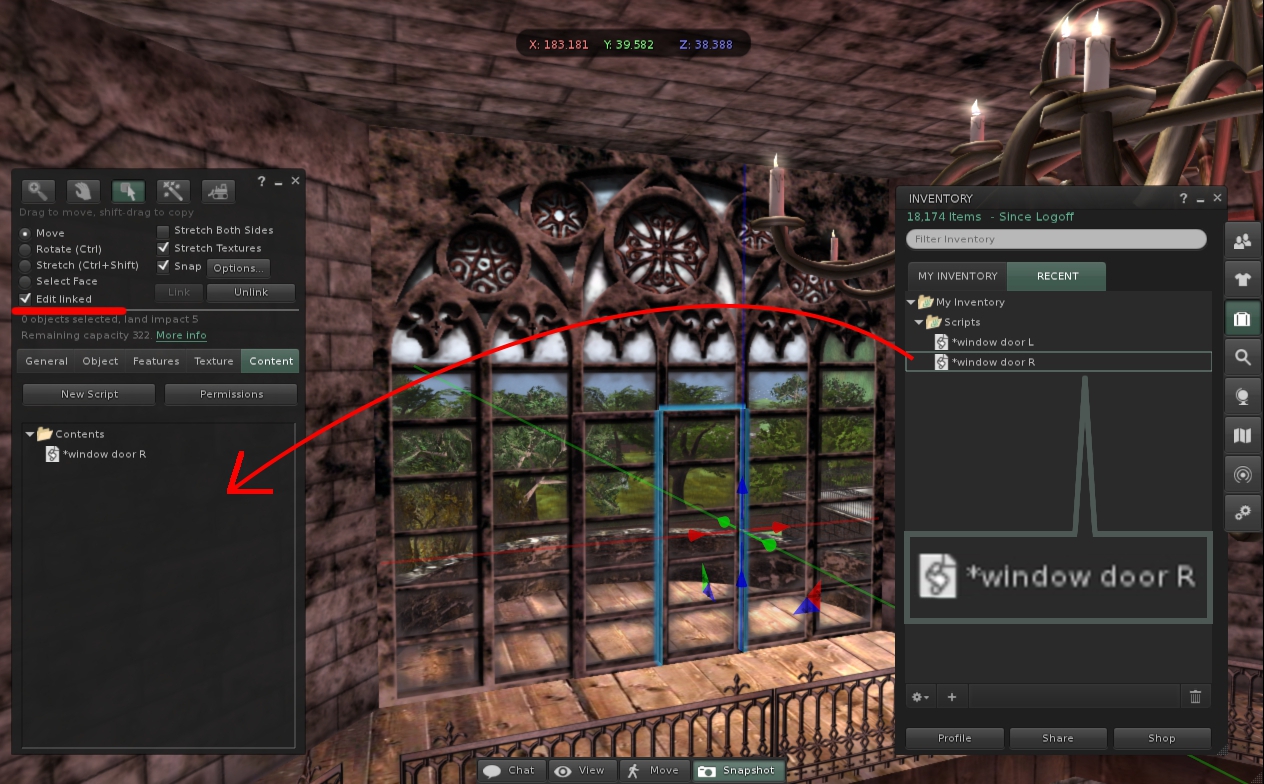

4)Dialog is displayed by your press and hold, and choose a button.
"Owner" --- Only an owner can open / close a door.
"Group" --- Only members of the group set at the door can open / close a door.
(A setup of a group is mentioned later)
"Anyone" --- Anyone can open / close a door.
"-exit -" --- Dialog is closed.
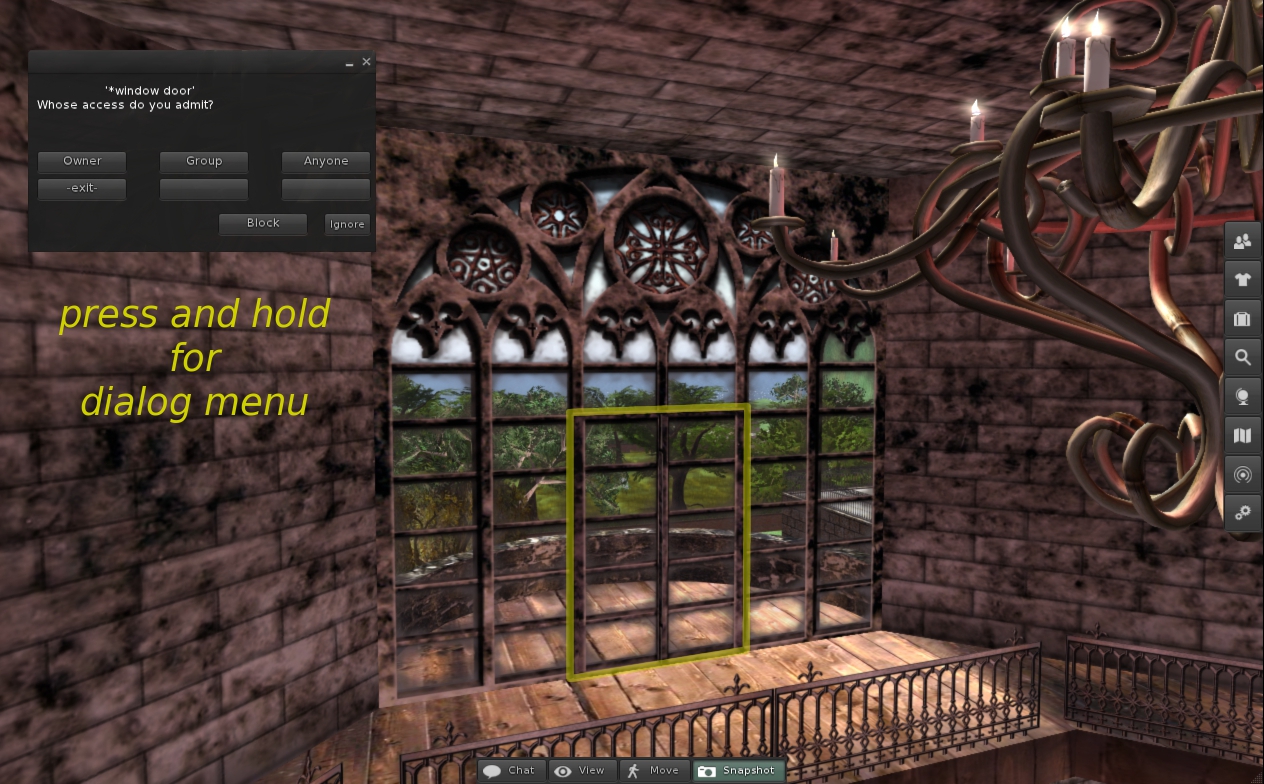

5)The door is opened and closed by a touch.
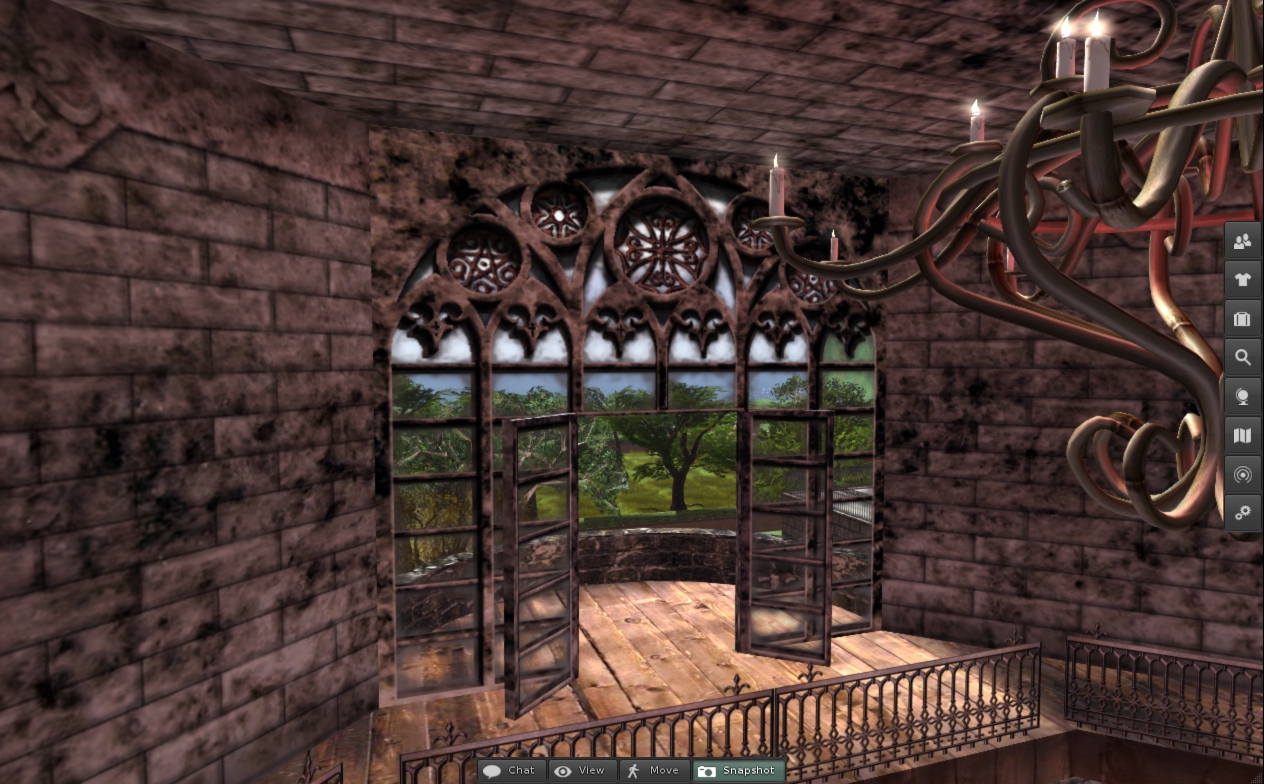

6)The present access permit describes at [description] of a general tab.
About a setup of the group permitted by "Group" ---
- The member of a group described in the [group] of a door is permitted access.
- How to change the group set as the door,
1)Push a button beside [group] and call a group list.
2)Choose the group which wants to admit access from a list, and push the OK button.
Cautions!!
When you rent land, objects may be returned if the group is changed.
Please confirm the agreement of land before change.
I am very grateful to all of you who bought our products and all of you reading this blog.


Access change script for *basement slide door

In *castle, there is a gloomy basement shut by the door of the heavy and thick iron grille.
Although anyone can open and close the door, we prepared this time 
the script which enables change of access to *basement slide door.

You only replace an old script with this new script,
and become able to choose the person who can access the door 
among "Owner only, Group member only, Anyone".

Please refer to the following reports about how to replace scripts.


about *castle http://ridi-ludi-fool.blogspot.com/2010/10/castle.html


The important news is delivered from [ ridi-ludi- fool ] group.
Please join us if interested.
http://world.secondlife.com/group/a528c4a9-31d8-c080-2d89-4c23494e821a

The script is in [ ridi-ludi- fool ] MAIN shop.
Please buy it with 0L$.


< How to replace script for *basement slide door

1)Please be sure to shut a door and to begin work.

2)Edit *basement slide door, and check "Edit linked" and choose the door.
Please confirm an object name is "Object" at this time.


3)Delete an old script "New Script" in contents.
Drag and drop a new script "*basement slide door" from your inventory to contents.


4)Dialog is displayed by your press and hold, and choose a button.
"Owner" --- Only an owner can open / close a door.
"Group" --- Only members of the group set at the door can open / close a door.
(A setup of a group is mentioned later)
"Anyone" --- Anyone can open / close a door.
"-exit -" --- Dialog is closed.


5)The door is opened and closed by a touch.


6)The present access permit describes at [description] of a general tab.
About a setup of the group permitted by "Group" ---
- The member of a group described in the [group] of a door is permitted access.
- How to change the group set as the door,
1)Push a button beside [group] and call a group list.
2)Choose the group which wants to admit access from a list, and push the OK button.
Cautions!!
When you rent land, objects may be returned if the group is changed.
Please confirm the agreement of land before change.
I am very grateful to all of you who bought our products and all of you reading this blog.


Access change script for *roof door

There is a secret door to rooftop in *castle.
Although only an owner can open and close the door, we prepared this time 
the script which enables change of access to *roof door.

You only replace an old script with this new script,
and become able to choose the person who can access the door 
among "Owner only, Group member only, Anyone".

Please refer to the following reports about how to replace scripts.


about *castle http://ridi-ludi-fool.blogspot.com/2010/10/castle.html


The important news is delivered from [ ridi-ludi- fool ] group.
Please join us if interested.
http://world.secondlife.com/group/a528c4a9-31d8-c080-2d89-4c23494e821a

The script is in [ ridi-ludi- fool ] MAIN shop.
Please buy it with 0L$.


< How to replace script for *roof door

1)Please be sure to shut a door and to begin work.

2)Edit *stairs of the roof, and check "Edit linked" and choose a secret door.
Please confirm an object name is "Object" at this time.


3)Delete an old script "New Script" in contents.
Drag and drop a new script "*roof door" from your inventory to contents.


4)Dialog is displayed by your press and hold, and choose a button.
"Owner" --- Only an owner can open / close a door.
"Group" --- Only members of the group set at the door can open / close a door.
(A setup of a group is mentioned later)
"Anyone" --- Anyone can open / close a door.
"-exit -" --- Dialog is closed.


5)The door is opened and closed by a touch.


6)The present access permit describes at [description] of a general tab.
About a setup of the group permitted by "Group" ---
- The member of a group described in the [group] of a door is permitted access.
- How to change the group set as the door,
1)Push a button beside [group] and call a group list.
2)Choose the group which wants to admit access from a list, and push the OK button.
Cautions!!
When you rent land, objects may be returned if the group is changed.
Please confirm the agreement of land before change.


[ ridi-ludi-fool ] *sky land (snow)


- It is snow island floats on the sky.
Please use as a platform of the sky house for winter.
- Prim can be stretched now to 64 m. Please edit it into the size suitable for your land.
- copy OK , modify OK , NO transfer
- 3 prims
- There is *castle (2000L$) by another sales.


DEMO is in the sky of the main shop http://slurl.com/secondlife/Bay%20City%20-%20Mashpee/189/185/26


List of Goods

Labels

new item (250) HONENOKE (152) Japonica (73) obi (62) kimono (48) NeoJapan (34) yukata (33) collaboration (27) jintaiya (22) model (21) fantasy faire (20) animesh (17) haori (17) bodyparts (16) castle (15) accessory (13) bones (12) making (12) BENTO (11) interior (11) Matsuri (10) outfit (10) Okinawa (9) Read Me: (9) mesh (9) skeleton (9) news (7) script (7) addon (6) dress (6) remake (6) Enchantment (5) Island (5) Orientilika (5) event (5) gacha (5) garden (5) kowloon (5) wing (5) DEMO (4) KAGAMI (4) LucieDoll (4) avatar (4) cocktail (4) michiyuki (4) shop (4) chair (3) chandelier (3) developers kit (3) elf (3) hamster (3) sculpted (3) shoes (3) Furisode (2) HUD (2) MidnightOrder (2) NO.12 (2) armor (2) chinese (2) clothes (2) costume (2) free gift (2) gothic (2) lamp (2) lighting (2) my... (2) uchikake (2) Japanese (1) Miko (1) NO.11 (1) SS (1) WLRP (1) alpha (1) blender (1) bokeh (1) boots (1) curtain (1) eyes (1) group (1) hakama (1) head-dress (1) main shop (1) mask (1) material (1) particle (1) robe (1) the New Year (1) tree (1) update (1)

Archive

TOP